Complete guide to buying a SIM card in Uzbekistan. Best carriers, prices, where to buy at the airport, how to top up, 4G coverage, and VPN tips. Everything you need to stay connected.
Landing in Uzbekistan and wondering how to get online? This is the definitive guide to buying a SIM card, getting mobile data, and staying connected throughout your Silk Road adventure.
Quick Answer: What You Need to Know
| Provider | Tourist SIM Price | Data | Best For |
|---|---|---|---|
| Beeline | $3-5 | 15-30GB | Best coverage, easiest for tourists |
| Ucell | $3-5 | 15-30GB | Good in cities |
| Mobi | $2-4 | 10-25GB | Budget option |
| Uztelecom | $3-5 | 15-30GB | Reliable coverage |
Bottom Line: Get a Beeline SIM at Tashkent Airport for $3-5. You'll have unlimited social media + 15-30GB data for 30 days.
Private Transfer
Need a private transfer across Uzbekistan?
Skip shared buses and unreliable taxis. Book a premium private car with fixed prices, professional drivers, and door-to-door service.
Where to Buy a SIM Card
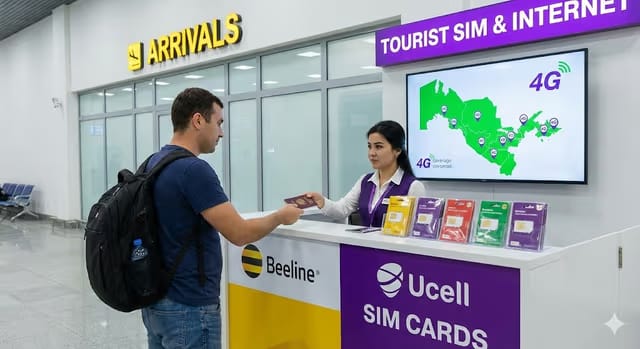
Option 1: Tashkent Airport (Recommended)
Location: After customs, before exit - look for mobile operator booths
What you need:
- Passport (they'll scan it)
- Cash (USD or Uzbek Sum) or card
- 5-10 minutes
Airport booth hours: Most are open 6 AM - 11 PM, some 24/7
Pro tip: Beeline has the most reliable airport booth. If there's a line, it's worth waiting.
Option 2: City Mobile Shops
Every city has official carrier stores:
- Tashkent: Amir Temur Street, Chorsu Bazaar area, major malls
- Samarkand: Registan area, main bazaar
- Bukhara: Near Lyabi-Hauz, main streets
- Khiva: Inside/near Ichan-Kala gates
Hours: Usually 9 AM - 6 PM, closed Sundays (some locations)
Option 3: Street Kiosks (Risky)
Small kiosks sell SIMs but:
- May not properly register your passport
- Could be deactivated later
- Limited English support
Recommendation: Stick to airport or official stores.
Best SIM Card Packages for Tourists
Beeline (Recommended)
Why Beeline?
- Best 4G coverage nationwide
- English-speaking staff at airport
- Easy top-up via app
- Works in remote areas (Khiva, Nurata, Aral Sea)
Tourist Packages:
| Package | Price | Data | Validity | Extras |
|---|---|---|---|---|
| Tourist Start | from $3 | 15GB | 15 days | Unlimited WhatsApp/Telegram |
| Tourist Plus | from $5 | 30GB | 30 days | Unlimited social media |
| Unlimited | from $8 | 50GB | 30 days | Hotspot included |
Ucell
Good for: City travelers, backup option
| Package | Price | Data | Validity |
|---|---|---|---|
| Guest | from $3 | 10GB | 15 days |
| Tourist | from $5 | 25GB | 30 days |
Mobi
Good for: Budget travelers, short trips
| Package | Price | Data | Validity |
|---|---|---|---|
| Basic | from $2 | 8GB | 10 days |
| Standard | from $4 | 20GB | 30 days |
Private Transfer
Uzbekistan · Door-to-Door
Need a private transfer across Uzbekistan?
Skip shared buses and unreliable taxis. Book a premium private car with fixed prices, professional drivers, and door-to-door service.
Step-by-Step: Buying Your SIM at the Airport
- Exit customs and look for mobile booths (right side usually)
- Choose Beeline booth (yellow branding)
- Show passport - they'll photograph/scan it
- Ask for "Tourist package" - say "Tourist SIM, thirty gigabytes"
- Pay ($3-5 depending on package)
- Wait 2-3 minutes for activation
- Test it - staff will help you check it works
- Get the app - download Beeline Uzbekistan app for top-ups
Total time: 5-10 minutes
How to Top Up Your SIM
Method 1: Mobile App (Easiest)
- Download Beeline Uzbekistan or Ucell app
- Register with your number
- Add international card (Visa/Mastercard work)
- Buy data packages directly
Method 2: Top-Up Cards
Buy scratch cards at:
- Any grocery store
- Street kiosks
- Pharmacies
- Hotel receptions
How to use:
- Scratch to reveal code
- Dial the activation number (on card)
- Enter the code
- Done!
Method 3: Payment Terminals
Look for PAYNET or Click terminals in:
- Shopping centers
- Metro stations
- Grocery stores
Instructions are in Russian but icons are clear.
Internet Speed & Coverage
4G Coverage by City
| Location | 4G Speed | Coverage |
|---|---|---|
| Tashkent | Excellent | Full city |
| Samarkand | Excellent | City + monuments |
| Bukhara | Very Good | Old city + new |
| Khiva | Good | Inside walls + surrounds |
| Nukus | Good | City center |
| Fergana Valley | Good | Cities, spotty rural |
| Mountain areas | Limited | 3G or none |
Typical Speeds
- Cities: 15-50 Mbps download
- Towns: 5-15 Mbps
- Rural: 1-5 Mbps (3G)
- Remote: No signal in true desert/mountains
Do You Need a VPN?
Currently Blocked/Restricted:
- Some social media may be slow without VPN
- Certain news websites
- Some streaming services
Recommended VPNs:
- NordVPN - works reliably
- ExpressVPN - fast speeds
- Surfshark - budget option
Pro tip: Download and set up your VPN BEFORE arriving in Uzbekistan.
Free WiFi Options
Hotels
- Budget hotels: Usually free, sometimes slow
- Mid-range: Generally good
- Luxury: Excellent speeds
Cafes & Restaurants
- Most tourist-area cafes have WiFi
- Ask for password: "WiFi parol?" (Russian) or just "WiFi?"
- Speed varies widely
Public Places
- Tashkent Metro: Free WiFi (registration required)
- Shopping malls: Usually available
- Airports: Free but slow
Common Problems & Solutions
"My SIM stopped working"
Cause: Registration issue or expired package
Solution:
- Check balance (dial *102# for Beeline)
- Visit any carrier store with passport
- They'll fix it for free
"No 4G signal"
Solution:
- Restart phone
- Go to Settings → Mobile Networks → Select 4G/LTE
- If in remote area, switch to 3G manually
"Can't call home"
Solution:
- Use WhatsApp/Telegram calls instead (free with data)
- For regular calls, buy international minutes ($1-2)
"My phone is locked"
Note: Some carrier-locked phones (especially from US) may not accept foreign SIMs. Check before traveling or use eSIM.
eSIM Option (Modern Phones)
If your phone supports eSIM:
Providers:
- Airalo - Uzbekistan packages from $5
- Holafly - Unlimited data from $19/week
- Nomad - Budget options from $4
Pros:
- Buy before arriving
- Keep your home number active
- No physical SIM needed
Cons:
- More expensive than local SIM
- May have slower speeds
- Not all phones support it
Money-Saving Tips
- Use WhatsApp/Telegram for calls - don't pay for minutes
- Download offline maps (Google Maps, Maps.me) before arriving
- Pre-download Netflix/Spotify content at hotel WiFi
- Share hotspot with travel companions - split the cost
- 15GB is enough for most 1-2 week trips
- Don't buy at kiosks - slightly cheaper but risky
What to Do Before You Fly
- ✅ Unlock your phone if carrier-locked
- ✅ Download VPN and test it works
- ✅ Download offline maps of Uzbekistan
- ✅ Save important numbers in WhatsApp
- ✅ Screenshot this guide for airport reference
- ✅ Have $5-10 cash ready for SIM purchase
Quick Reference Card
Save this for the airport:
BEELINE TOURIST SIM
Price: from $5 for 30GB/30 days
Balance check: *102#
Data check: *103#
App: Beeline Uzbekistan
Support: 0611 (free from Beeline)
Need More Help?
TourFixer offers:
- Airport pickup + SIM setup: We'll help you get connected
- Travel SIM included with some tour packages
- 24/7 WhatsApp support once you're connected
Contact TourFixer - We'll answer any questions!
Prices and packages updated January 2026. Carriers occasionally change offerings.
[[CTA-GUIDE city="Samarkand"]]
Frequently Asked Questions
Quick Answer: What You Need to Know?
| Provider | Tourist SIM Price | Data | Best For | |----------|------------------|------|----------| | Beeline | $3-5 | 15-30GB | Best coverage, easiest for tourists | | Ucell | $3-5 | 15-30GB | Good in cities | | Mobi | $2-4 | 10-25GB | Budget option | | Uztelecom | $3-5 | 15-30GB | Reliable coverage | Bottom Line: Get…
Where to Buy a SIM Card?
Option 1: Tashkent Airport (Recommended) Location: After customs, before exit - look for mobile operator booths What you need: - Passport (they'll scan it) - Cash (USD or Uzbek Sum) or card - 5-10 minutes Airport booth hours: Most are open 6 AM - 11 PM, some 24/7 Pro tip: Beeline has the most reliable airport booth. If there's…
Best SIM Card Packages for Tourists?
Beeline (Recommended) Why Beeline? - Best 4G coverage nationwide - English-speaking staff at airport - Easy top-up via app - Works in remote areas (Khiva, Nurata, Aral Sea) Tourist Packages: | Package | Price | Data | Validity | Extras | |---------|-------|------|----------|--------| | Tourist Start | $3 | 15GB | 15 days | Unlimited WhatsApp/Telegram | | Tourist Plus…
Step-by-Step: Buying Your SIM at the Airport?
- Exit customs and look for mobile booths (right side usually) 2. Choose Beeline booth (yellow branding) 3. Show passport - they'll photograph/scan it 4. Ask for "Tourist package" - say "Tourist SIM, thirty gigabytes" 5. Pay ($3-5 depending on package) 6. Wait 2-3 minutes for activation 7. Test it - staff will help you check it works 8. **Get…